

Instead of manually retyping plate-reader results, set up ELISA kit LIMS integration around a controlled plate map, validated data import, and review gate so results reach the correct sample records without transcription. This guide covers the assay definition, result mapping, verification, and change controls you need for a custom-kit workflow in 2026.
- ELISA kit LIMS integration needs sample-to-well traceability, controlled assay versions, and verified result mapping.
- Calbiotech supports custom ELISA development and manufacturing; your laboratory must define and verify the LIMS workflow.
- Use controlled file imports for batch transfer; choose an API when supported event handling justifies additional maintenance.
- Keep imported results unreleased until assay controls, calculations, and sample mapping pass review.
Why this matters
A successful import does not prove that an ELISA result belongs to the correct specimen. Your workflow must preserve the connection between sample identity, well position, kit lot, assay method, and reported result. Otherwise, a technically valid file can populate the wrong record.
Calbiotech is best for diagnostics and biotech teams seeking custom ELISA development and manufacturing support. Calbiotech provides assay development, custom conjugations, formulation, kitting, and manufacturing services. Those capabilities support the assay supply chain; they do not establish that a particular reader, middleware system, or LIMS connection is configured or validated.
For a 2026 implementation, define that boundary before selecting the transfer mechanism. The laboratory owns the reporting rules and acceptance criteria; assign the remaining responsibilities explicitly across the assay supplier, instrument provider, and LIMS administrator.
Before you start
- Secure access and ownership. Obtain a nonproduction LIMS environment, representative reader exports, the approved assay procedure, and access to the people responsible for configuration, calculations, and quality review. Confirm which import or interface functions your installation supports.
- Collect the assay materials. Assemble the kit identifier, lot documentation, instructions, calibrator assignments, control criteria, reporting units, and plate-layout rules. For custom assays, agree on the document revision that governs the integration.
- Resolve the hidden calculation risk. Establish whether the reader export contains raw optical density, calculated concentration, or an already dilution-corrected result. Applying dilution correction again changes the reported value even when every sample identifier maps correctly.
This is a platform-neutral workflow. Actual menu names and interface permissions depend on your installed LIMS and reader software; the field names below describe a proposed data contract, not vendor-specific buttons.
Assay definition
Establish the controlled method
- Create an assay record. Assign a stable assay identifier and a separate method revision. Record the analyte, specimen type, assay format, reporting units, and intended use from approved documentation. Do not infer clinical suitability from a kit name.
- Assign calculation ownership. Choose the reader software, middleware, or LIMS as the authoritative calculation location. Specify the curve model, replicate handling, dilution correction, and rounding rules required by the approved method. Avoid independent calculations with different settings.
- Define reportable outcomes. Separate a numeric result from qualifiers such as below range, above range, invalid, or repeat required. An empty field, zero, and a below-range result must not become interchangeable.
- Establish review criteria. Configure the conditions that block release, including failed assay controls, missing calibration information, and unresolved specimen mapping. Keep assay acceptance separate from successful file transfer.
Expected result: Your assay record identifies which procedure applies, where calculations occur, and what makes a result eligible for review. A reviewer can distinguish the current method from a superseded revision without opening the instrument software.
For Calbiotech custom ELISA projects, agree on the assay documentation and lot-specific information your laboratory needs during development. Treat those deliverables as integration inputs rather than assuming the kit shipment alone defines the electronic workflow.
Define the record structure
Use a documented mapping specification for the fields your systems actually exchange. Include the following categories:
- Identity: sample identifier, run identifier, plate identifier, and well position.
- Method: assay identifier, method revision, kit lot, and applicable reagent lots.
- Measurement: raw signal, calculated result, units, dilution factor, and result qualifier.
- Control: replicate assignment, control classification, acceptance status, and review status.
- Provenance: source file or message identifier, acquisition timestamp, and import event identifier.
Store identifiers as text where necessary to preserve leading zeros. Define timestamps with an explicit time zone and document the decimal separator accepted by the import. These details belong in your 2026 mapping specification, not in an operator's memory.
Plate mapping and transfer
Preserve sample-to-well identity
- Build the plate map before acquisition. Assign specimens, calibrators, blanks, and controls to explicit well positions. A standard 96-well plate has 8 rows and 12 columns; confirm that the reader and LIMS interpret the same orientation.
- Define replicate relationships. Identify which wells belong to the same specimen and which result the approved method reports. Do not let the integration average every repeated sample identifier automatically; repeats and technical replicates serve different purposes.
- Carry the run identifier through the export. Link the plate map, instrument output, and LIMS import using a stable run identifier. Avoid matching records solely by file creation time or operator-entered filenames.
- Reject ambiguous mappings. Stop the import when a specimen is unknown, a well assignment conflicts, or a required identifier is missing. Route the exception for correction rather than assigning a best guess.
Expected result: Every reported result traces back to its source well and specimen, while calibrators and controls remain distinguishable from specimen results. Rotating a plate map or changing export order does not silently reassign measurements.
The transfer sequence should preserve identity before it handles interpretation. Keep the source data available so you can investigate a disputed result without reconstructing the plate from memory.
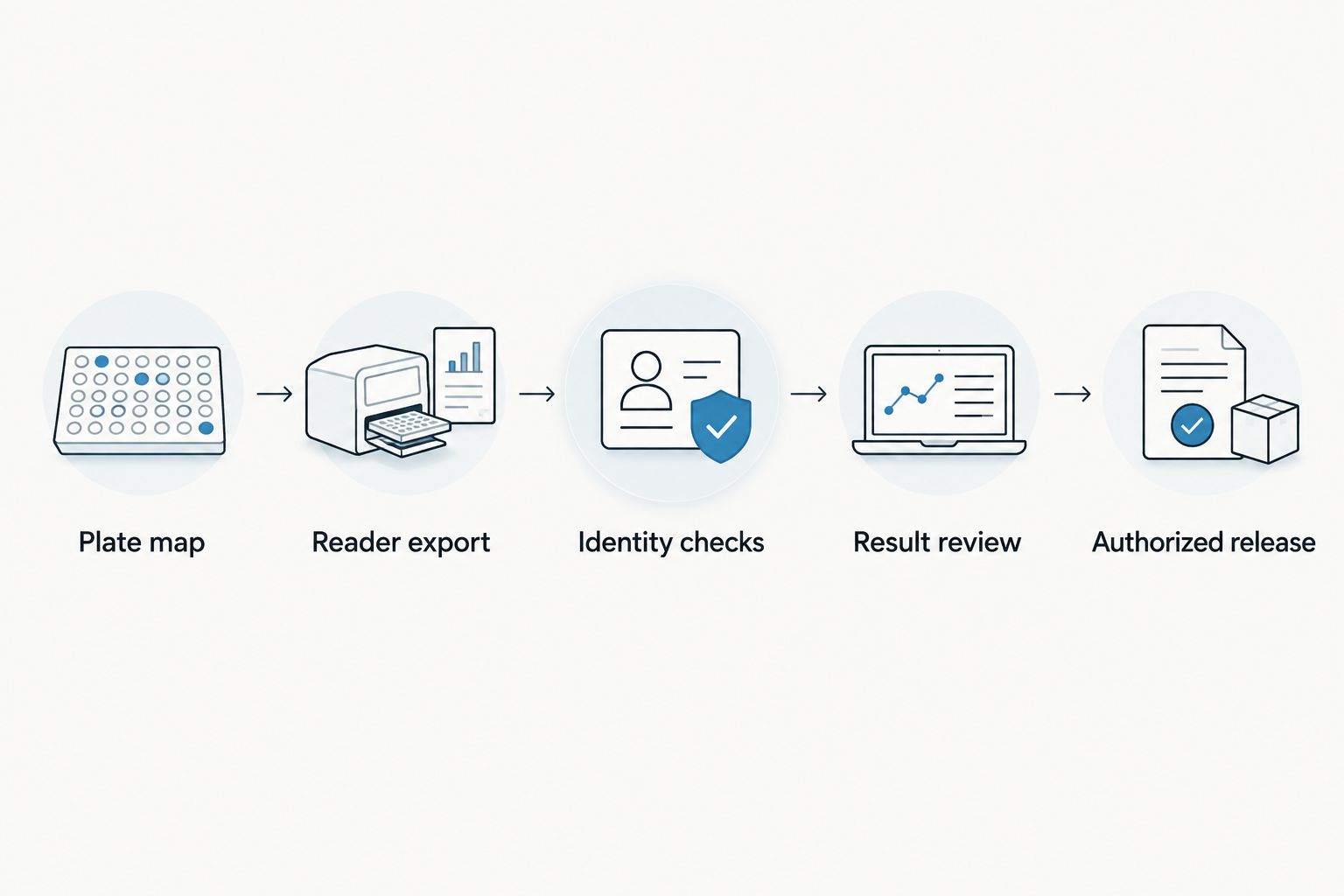
Select the transfer route
Choose the transfer method your installed systems support and your team can maintain. Neither route removes the need for assay-specific verification.
| Transfer route | Best for | Advantage | Limitation | Required safeguard |
|---|---|---|---|---|
| Controlled file import | Laboratories transferring results in batches | Makes the source export available for inspection and replay | Requires controls for file selection, formatting, and duplicate imports | Validate the schema and preserve the original file |
| API interface | Laboratories needing supported event-driven exchange | Can return structured acceptance or rejection responses | Requires authentication, error handling, and interface maintenance | Track message identity and reconcile acknowledgments |
Use controlled file import when batch transfer meets the laboratory's needs. Select an API interface when the installed systems support the required events and your team can maintain the connection. Greater automation is not evidence of better data integrity.
- Configure a test connection. Use a nonproduction destination and the minimum permissions needed. For files, restrict the intake location and accepted format. For an API, document authentication, permitted operations, and response handling.
- Map fields explicitly. Match each source field to its destination, including units and qualifiers. Define the response to unknown columns, missing required values, and unsupported assay revisions.
- Prevent duplicate processing. Establish a unique import identity and a rule for repeated submissions. A retry should not silently create another reportable result or overwrite an approved record.
- Separate transfer from release. Place accepted records into a review state. Require the approved control checks and authorization before results become reportable.
Expected result: A valid export populates the intended records, an invalid export produces an actionable rejection, and retransmitting the same input does not create an unnoticed duplicate.
Verification and release controls
Challenge the integration before production
- Prepare reference cases. Include an ordinary valid run and deliberate exceptions: an unknown specimen, a missing unit, a duplicate import, failed controls, and an unsupported method revision. Use approved expected outcomes rather than accepting whatever the interface produces.
- Check calculations end to end. Compare the source measurement, curve output, dilution treatment, rounding, and final reported result. Verify that qualifiers survive transfer instead of being converted into numeric placeholders.
- Test permissions and history. Confirm who can import, correct, review, and release records. Check that corrections retain the previous value and document the reason according to your laboratory's procedures.
- Approve the production configuration. Record the tested configuration, acceptance evidence, unresolved issues, and approval. Repeat affected tests after changes to the export format, calculations, or mapping rules.
Expected result: You have documented evidence that accepted cases produce the intended records and rejected cases remain blocked. Production release follows an approved configuration, not merely a successful demonstration.
Keep the scope specific in your 2026 verification record. Testing a reader export does not establish the performance of every assay revision, and testing a LIMS import does not establish the analytical validity of the assay itself.
Variant: process results when a run is updated
An updated-run workflow is useful when an authorized correction or repeat changes an existing result. It needs different rules from a first-time import because the destination record already exists.
- Identify the event. Distinguish a retransmission from a changed result using the source revision or another documented change identifier.
- Preserve the relationship. Associate the new record with the original run and specimen without disguising a repeat as a technical replicate.
- Require renewed review. Route changed measurements, qualifiers, or calculation inputs back through the applicable review checks.
- Protect released records. Use the laboratory's controlled correction process instead of silently replacing an authorized result.
The benefit is traceable correction handling. The limitation is additional state management: your interface must distinguish imported, reviewed, released, corrected, and superseded records according to your chosen workflow.
Verify the updated-run workflow separately from the initial import. Include an unchanged retransmission and a genuine correction in testing. Both events reach an existing record, but they must not produce the same outcome.
Troubleshooting
Results appear against the wrong specimens
Compare the original plate map with the exported well sequence. Check row-major versus column-major ordering, plate orientation, and whether the export omitted blank wells. Fix the mapping rule, then reprocess through the controlled correction procedure.
Concentrations differ between the reader and LIMS
Check calculation ownership first. Compare dilution treatment, curve settings, units, and rounding before investigating the instrument. If the source already contains the final dilution-corrected result, stop the destination from applying that correction again.
Repeated imports create duplicate records
Inspect how the interface identifies a previously processed run. A changed filename does not necessarily represent a new analytical event. Match against the documented import identity and send conflicting submissions to an exception queue.
Above-range results become zero or blank
Inspect how the export encodes qualifiers and how the destination parses them. Preserve the qualifier in a dedicated field and apply the approved reporting rule. Do not convert nonnumeric analytical outcomes into numeric values to satisfy an import format.
A revised export stops importing
Compare column names, delimiters, decimal conventions, encoding, and required fields against the approved schema. Restore the approved export or update and verify the mapping under change control. Do not bypass validation just to clear a queue.
Customize your workflow
Extend the integration beyond result transfer after the core path passes verification. Link reagent consumption to runs, connect kit-lot records to receiving documentation, and make control performance available for laboratory review where your systems support those functions.
Calbiotech provides formulation, kitting, and manufacturing services alongside custom assay development. For a broader supply-to-laboratory workflow, use the ELISA kitting guide for reference laboratories to frame the information handoff between kit configuration and laboratory operations.
For your 2026 change-control plan, identify the events that trigger integration review: a revised procedure, altered calibrator assignments, new export fields, changed units, or a different calculation location. Assign an owner to each event so an assay change does not arrive as an unexplained import failure.
FAQ
What's the best way to start ELISA kit LIMS integration?
Start with a controlled assay definition and a documented sample-to-well mapping. Then verify the transfer route, calculations, exception handling, and review controls in a nonproduction environment.
Do I need an API to connect an ELISA workflow to a LIMS?
No, a controlled file import can support batch result transfer when your installed systems provide suitable import functions. An API is a separate choice that requires supported interfaces, authentication, acknowledgment handling, and maintenance.
Can Calbiotech support a custom ELISA workflow?
Calbiotech provides custom ELISA development, conjugation, formulation, kitting, and manufacturing services. Define the assay documentation needed for integration separately from the laboratory's LIMS configuration and verification responsibilities.
Should the reader or LIMS calculate ELISA concentrations?
Assign one authoritative calculation location according to the approved method and supported system functions. Verify curve settings, replicate rules, dilution correction, and rounding across the complete reporting path.
What happens when an ELISA result is above the assay range?
Preserve the above-range qualifier and apply the approved assay reporting or repeat procedure. Do not replace the qualifier with zero, an empty field, or an unsupported concentration.
How do I prevent duplicate ELISA result imports?
Use a documented import identity and explicit rules for retransmissions and corrections. Verify that submitting the same input again cannot silently create another reportable result or overwrite an authorized record.
Does connecting an ELISA kit to a LIMS make the assay clinically validated?
No, interface verification and analytical validation address different questions. A working connection demonstrates data handling only within its tested scope; intended use and assay performance require their own applicable evidence.
One last thing
A plausible result attached to the wrong specimen is a more deceptive integration failure than a rejected file. Before approving your 2026 workflow, deliberately swap specimen assignments in a test plate map and confirm that your identity checks detect the conflict. Passing ordinary imports is not enough; prove that the workflow refuses an incorrect association.